Идея и дизайн
Сначала я определила визуальный образ.
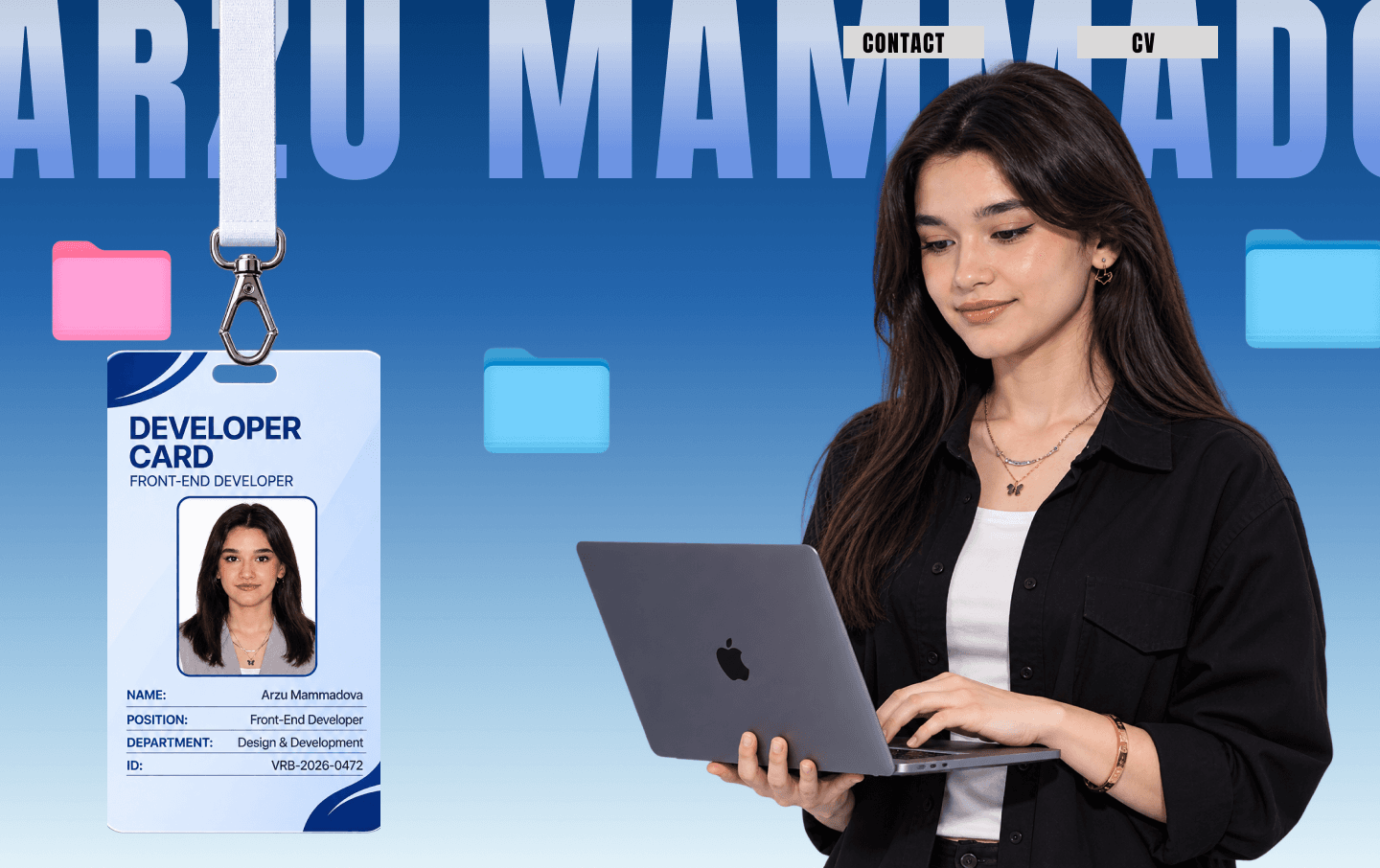
В центре портфолио — мой визуальный образ: синий градиент, крупное имя, портрет с MacBook, подвешенная карточка разработчика и цветные папки. Я подготовила отдельные референсы первого экрана и презентации проектов. Портрет, карточка, ноутбук и декор сохранены отдельными PNG, чтобы на сайте их можно было анимировать независимо.
Промпт для видео
От статичного дизайна к идее движения.
Задание для видео я разделила на три сцены: спокойное вступление, приближение к ноутбуку и включение экрана. В промпте отдельно указано сохранить лицо, одежду, карточку и текст. Ниже — видео, предоставленное мной как референс анимации сайта, и полный промпт, описывающий это направление.
- 0–4 секунды
Знакомство с разработчиком
Лёгкое движение рук, спокойное покачивание карточки и небольшая глубина парящих папок.
- 4–6 секунд
Приближение к ноутбуку
Камера приближается к MacBook, композиция переходит ко второй сцене без резкого монтажа.
- 6–10 секунд
Появление портфолио
Чёрный экран включается, превью проектов появляются последовательно.
Промпты сохранены в оригинале на английском. Можно скопировать весь текст или скачать TXT.
Показать / скрыть полный промпт
Create a cinematic, ultra-smooth 16:9 portfolio introduction video using the two provided reference images. Preserve the exact visual identity, character appearance, outfit, colors, objects, and overall composition of both reference images.

SCENE 1 — DEVELOPER INTRO (0–4 seconds)

Start with the first reference image exactly as the opening frame.

- The girl on the right gently and naturally moves her fingers while typing on her MacBook keyboard.
- Her head and eyes make very subtle natural movements as she looks at the laptop screen.
- The Developer ID Card hanging on the left gently swings from side to side, as if affected by a light breeze.
- The ID card and its strap have realistic, subtle physics.
- The floating pink and blue folders move very slightly, creating a sophisticated 3D depth effect.
- Keep the large background typography and all text unchanged and readable.
- The camera remains mostly stable, with a very subtle cinematic push-in.

SCENE 2 — GSAP TRANSITION (4–6 seconds)

Create a seamless, premium transition inspired by GSAP animation techniques.

- The camera smoothly accelerates toward the MacBook.
- Use a cinematic dolly-in combined with a smooth scale animation.
- As the camera approaches the laptop, the laptop becomes the main focus.
- Use a sophisticated seamless zoom transition with subtle motion blur.
- The first scene smoothly transforms into the second reference image.
- No sudden cuts, no glitches, no distorted objects.

SCENE 3 — PORTFOLIO REVEAL (6–10 seconds)

Match the second reference image's composition.

- The MacBook screen starts completely black.
- The screen gradually powers on with a subtle, elegant light effect.
- A beautiful, modern Front-End Developer portfolio website appears on the screen.
- Show a sophisticated portfolio interface with multiple website project previews arranged in a clean grid.
- Display different modern website designs: a professional corporate website, an e-commerce website, a dashboard/CRM interface, and a reservation management website.
- Website previews should have realistic layouts, navigation bars, typography, images, and colorful UI elements.
- Animate the portfolio projects smoothly appearing on the screen, one after another.
- Add subtle scrolling or UI movement inside the portfolio website to make it feel like a real working website.
- The final frame should clearly showcase the portfolio websites on the MacBook display.

VISUAL STYLE

Premium creative developer portfolio aesthetic, realistic 3D depth, professional cinematic lighting, smooth motion, realistic human movement, high-quality MacBook details, clean blue gradient background, elegant motion design.

IMPORTANT

- Preserve the girl's original face and appearance.
- Do not change the Developer Card design or text.
- Do not introduce additional people.
- Do not deform the MacBook or its screen.
- Keep the laptop screen facing the camera and make the portfolio clearly visible.
- No random text, no visual glitches, no flickering.
- Smooth, polished animation with professional GSAP-style easing.
- 16:9, 4K quality, 60 FPS.
Промпт для фронтенда
Затем я превратила идею в сайт.
Для фронтенда я выбрала Next.js App Router, React, TypeScript, Tailwind CSS, GSAP и next-intl. В задании — закреплённая сцена под управлением прокрутки, смена проектов внутри неподвижного MacBook, отдельные страницы и три языка. Руки на статичном портрете сайта не двигаются независимо; трансформации и плавное изменение прозрачности приближают переход камеры. Вторая сцена использует белый фон по прямому требованию задания.
Промпты сохранены в оригинале на английском. Можно скопировать весь текст или скачать TXT.
Показать / скрыть полный промпт
Act as a senior Frontend Engineer, UI/UX developer, and GSAP animation specialist.

I want you to build my personal Front-End Developer portfolio website using **Next.js, React, TypeScript, and Tailwind CSS**.

Your most important task is to recreate my provided visual references as accurately as possible. Do not redesign them, simplify them, or replace them with your own creative interpretation. Pixel-perfect visual accuracy is the priority.

# 1. FIRST: ANALYZE ALL PROVIDED ASSETS

Before writing any code, carefully inspect the following directory:

`C:\Users\hp\Desktop\portfolio\images`

Important reference files:

- `Desktop - 1 (2).png` — Main homepage / first screen design.
- `Desktop - 4 (2).png` — Second screen design.
- `Desktop - 6.png` — Alternative MacBook screen and floating decorative elements.
- `animation.mp4` — The original animation reference. Watch the entire video carefully, analyze its timing, transitions, camera movements, object animations, and scroll behavior.

There are also additional images and icons inside this directory. Inspect them all and identify which assets belong to the website.

IMPORTANT:
- Use the provided images as actual visual references.
- Reuse the supplied PNG assets wherever appropriate.
- Do not recreate existing images using CSS if the original image is available.
- Do not use random stock images or unrelated illustrations.
- Preserve the original design, proportions, colors, typography, spacing, and composition.

# 2. TECHNOLOGY STACK

Use:

- Next.js (App Router)
- React
- TypeScript
- Tailwind CSS
- GSAP
- GSAP ScrollTrigger
- next-intl for internationalization
- Lucide React for icons only when no original icon asset exists

Use clean, reusable, component-based architecture.

Do not use plain HTML pages or build everything inside one giant component.

# 3. HOMEPAGE — FIRST SCREEN

Reference: `Desktop - 1 (2).png`

Recreate this screen as closely as possible.

Requirements:

- Match the screenshot's exact layout and positioning.
- Preserve the blue gradient background and typography.
- Keep the large background name typography.
- Keep the girl with the MacBook on the right.
- Keep the Developer ID Card on the left.
- Preserve the floating pink and blue folders.
- Maintain the original visual hierarchy and spacing.
- Use the original images from the assets directory.

Header navigation:

- Contact
- CV

The header must be properly positioned according to the reference design.

Subtle animations:
- The girl should have a natural typing animation if the supplied visual supports it.
- The Developer Card should gently swing.
- Floating folders should have subtle floating animations.
- Keep animations elegant and minimal.

Do not overanimate this first screen.

# 4. SECOND SCREEN — MACBOOK PORTFOLIO SHOWCASE

Reference: `Desktop - 4 (2).png`

This section must reproduce the reference screenshot almost pixel-perfectly.

Important design specifications:

- Reference canvas: 1440 × 919 px.
- Background: #FFFFFF.
- MacBook positioned centrally.
- Large MacBook with a completely black screen initially.
- Pink folder on the left.
- Blue folder on the right.
- Preserve exact proportions, positioning, shadows, and spacing.

Use the original MacBook and decorative assets where available.

## INTERACTIVE PORTFOLIO SHOWCASE

The MacBook must behave like an interactive portfolio presentation.

When the user clicks the NEXT button:

- The overall section layout must remain unchanged.
- The MacBook must stay in exactly the same position.
- The MacBook itself must not move or resize.
- Only the content displayed inside the MacBook screen changes.
- The floating decorative images around the MacBook also change to their corresponding next-state assets.
- Use `Desktop - 6.png` as a visual reference for the corresponding next state.

The transition must be smooth and cinematic.

Implement multiple portfolio showcase states if the provided assets support them.

Use GSAP to animate the screen content transitions:
- Smooth opacity transitions.
- Subtle scale transitions.
- Elegant image replacement.
- Smooth transitions for surrounding decorative elements.

Add PREVIOUS and NEXT navigation controls where appropriate.

Do not reload the page when navigating between showcase states.

# 5. MOST IMPORTANT — GSAP SCROLL ANIMATION

Reference: `animation.mp4`

This video is the primary animation reference.

Watch and analyze it carefully before implementing the second section.

I want the website scroll interaction to reproduce the animation in the video as closely as technically possible.

Expected behavior:

1. The user enters the homepage and sees the first design.
2. As the user scrolls down, the transition into the second section begins.
3. The second section becomes pinned during the animation.
4. The MacBook gradually becomes the main visual focus.
5. The camera-like zoom and transition effects should match the original video.
6. The MacBook screen and surrounding objects should animate exactly according to the reference.
7. The second section should settle into the clean white-background MacBook composition.

Use:
- GSAP ScrollTrigger
- ScrollTrigger pin
- Scrub-based animation
- Timeline sequencing
- Carefully controlled scale and transform animations
- Appropriate easing
- Smooth opacity transitions
- Layered animations for floating elements

IMPORTANT:
The animation must be scroll-driven, not simply an automatic animation that plays when the page loads.

The user must control the animation through scrolling.

Avoid excessive animation, unnecessary parallax, and random movement.

The final result should feel like the original video has been recreated as a real interactive website.

# 6. ADDITIONAL PAGES AND ROUTING

Create separate, fully functional pages with proper Next.js App Router routing.

Required pages:

- `/` — Home
- `/why-me` — Why Me
- `/blog` — Blog
- `/contact` — Contact
- `/cv` — CV / Resume

Header navigation must work correctly.

When clicking a navigation item, navigate to its corresponding page.

Requirements:
- Proper routing.
- Responsive layouts.
- Consistent visual identity across pages.
- Smooth page transitions where appropriate.
- Working navigation links.
- Active navigation states.
- No broken routes or placeholder links.

The Why Me page should present my strengths, technical skills, development approach, and reasons to work with me.

The Blog page should have a clean article listing layout.

The Contact page should contain my contact information and a functional contact form with validation.

The CV page should present my professional experience, education, skills, and projects, with an option to download my CV.

Keep the homepage's original visual design as the main design direction.

# 7. INTERNATIONALIZATION (i18n)

Implement complete multilingual support using `next-intl`.

Supported languages:

- Azerbaijani (az)
- English (en)
- Russian (ru)

Requirements:

- Add a language switcher in the header.
- All navigation labels and page content must be translated.
- All buttons, headings, descriptions, forms, and UI labels must support all three languages.
- Language switching must preserve the current page.
- Use locale-based routing.

Example:
- `/az`
- `/en`
- `/ru`

Azerbaijani should be the default language.

Organize translations into separate JSON files.

Do not hardcode user-facing text inside components.

# 8. DESIGN AND VISUAL QUALITY

The website must follow the supplied references.

Main visual direction:
- Premium creative developer portfolio.
- Blue gradient first screen.
- Clean white second screen.
- Minimalist composition.
- Professional typography.
- High-quality visual details.
- Smooth cinematic animations.

Do not introduce unnecessary colors or gradients.

For the second screen, preserve the exact white background:

`background: #FFFFFF;`

Do not change the background to a blue gradient.

# 9. RESPONSIVENESS

Desktop (1440px) is the primary target.

Also adapt the website for:
- 1920px desktop
- 1366px laptop
- Tablet
- Mobile

The desktop version must receive the highest priority because the supplied references are desktop designs.

Do not destroy the original composition when making the layout responsive.

For mobile, adapt the animation intelligently instead of forcing the full desktop pinning experience.

# 10. CODE QUALITY AND PERFORMANCE

Requirements:

- Use reusable React components.
- Use TypeScript properly.
- Avoid unnecessary dependencies.
- Optimize images.
- Use Next.js Image where appropriate.
- Clean up GSAP ScrollTriggers and timelines on component unmount.
- Avoid hydration errors.
- Avoid layout shifts.
- Ensure smooth scrolling and animation performance.
- Use proper semantic HTML.
- Make all buttons and interactions functional.

Organize the project into logical folders for:
- Components
- Sections
- Pages / routes
- Animations
- Hooks
- Translations
- Assets
- Data

# 11. EXECUTION INSTRUCTIONS

Follow this exact workflow:

STEP 1: Inspect every relevant image and asset in the images directory.

STEP 2: Watch `animation.mp4` and analyze the complete animation sequence.

STEP 3: Understand how the first and second screenshots relate to each other.

STEP 4: Create a clear implementation plan.

STEP 5: Build the homepage and reproduce both reference screens.

STEP 6: Implement the GSAP scroll-driven animation based on the video.

STEP 7: Implement the interactive MacBook NEXT/PREVIOUS functionality.

STEP 8: Build Why Me, Blog, Contact, and CV pages.

STEP 9: Implement Azerbaijani, English, and Russian translations.

STEP 10: Test the website at 1440px and other screen sizes.

STEP 11: Compare the actual implementation against the original screenshots and fix all visible differences.

Do not stop after creating a basic layout. Complete the actual implementation.

Do not replace complex animations with simple CSS transitions.

Do not use generic templates.

Do not change the original design.

**FINAL GOAL:**

I want a professional, fully functional, visually accurate portfolio website that looks like my supplied designs and behaves like my original `animation.mp4` video.

The first and second screens must be visually as close to the reference images as possible. The transition between them must reproduce the original video animation using GSAP and ScrollTrigger.

Prioritize visual accuracy, animation quality, and clean code over unnecessary design creativity.